






Assignment: (Understand only)
-
Understand the basic form and functioning of the computer Hard Disk
At the simplest level, a hard disk is not that different from a cassette tape. Both hard disks and cassette tapes use the same magnetic recording techniques. Hard disks and cassette tapes also share the major benefits of magnetic storage -- the magnetic medium can be easily erased and rewritten, and it will "remember" the magnetic flux patterns stored onto the medium for many years.
Let's look at the big differences between cassette tapes and hard disks:
- The magnetic recording material on a cassette tape is coated onto a thin plastic strip. In a hard disk, the magnetic recording material is layered onto a high-precision aluminum or glass disk. The hard-disk platter is then polished to mirror-type smoothness.
- With a tape, you have to fast-forward or reverse to get to any particular point on the tape. This can take several minutes with a long tape. On a hard disk, you can move to any point on the surface of the disk almost instantly.
- In a cassette-tape deck, the read/write head touches the tape directly. In a hard disk, the read/write head "flies" over the disk, never actually touching it.
- The tape in a cassette-tape deck moves over the head at about 2 inches (about 5.08 cm) per second. A hard-disk platter can spin underneath its head at speeds up to 3,000 inches per second (about 170 mph or 272 kph)!
- The information on a hard disk is stored in extremely small magnetic domains compared to a cassette tape's. The size of these domains is made possible by the precision of the platter and the speed of the medium.
Because of these differences, a modern hard disk is able to store an amazing amount of information in a small space. A hard disk can also access any of its information in a fraction of a second.
A typical desktop machine will have a hard disk with a capacity of between 10 and 40 gigabytes. Data is stored onto the disk in the form of files. A file is simply a named collection of bytes. The bytes might be the ASCII codes for the characters of a text file, or they could be the instructions of a software application for the computer to execute, or they could be the records of a data base, or they could be the pixel colors for a GIF image. No matter what it contains, however, a file is simply a string of bytes. When a program running on the computer requests a file, the hard disk retrieves its bytes and sends them to the CPU one at a time.
There are two ways to measure the performance of a hard disk:
- Data rate - The data rate is the number of bytes per second that the drive can deliver to the CPU. Rates between 5 and 40 megabytes per second are common.
- Seek time - The seek time is the amount of time between when the CPU requests a file and when the first byte of the file is sent to the CPU. Times between 10 and 20 milliseconds are common.
The other important parameter is the capacity of the drive, which is the number of bytes it can hold.
The best way to understand how a hard disk works is to take a look inside. (Note that OPENING A HARD DISK RUINS IT, so this is not something to try at home unless you have a defunct drive.)
It is a sealed aluminum box with controller electronics attached to one side. The electronics control the read/write mechanism and the motor that spins the platters. The electronics also assemble the magnetic domains on the drive into bytes (reading) and turn bytes into magnetic domains (writing). The electronics are all contained on a small board that detaches from the rest of the drive:
Underneath the board are the connections for the motor that spins the platters, as well as a highly-filtered vent hole that lets internal and external air pressures equalize.
Removing the cover from the drive reveals an extremely simple but very precise interior.
During the Demo in class you saw:
- The platters, which typically spin at 3,600 or 7,200 rpm when
the drive is operating. These platters are manufactured to amazing
tolerances and are mirror-smooth (as you can see in this interesting
self-portrait of the author... no easy way to avoid that!).
- The arm that holds the read/write heads is controlled by the mechanism in the upper-left corner, and is able to move the heads from the hub to the edge of the drive. The arm and its movement mechanism are extremely light and fast. The arm on a typical hard-disk drive can move from hub to edge and back up to 50 times per second -- it is an amazing thing to watch!
In order to increase the amount of information the drive can store, most hard disks have multiple platters. This drive has 2 platters and 4 read/write heads.
Data is stored on the surface of a platter in sectors and tracks. Tracks are concentric circles, and sectors are pie-shaped wedges on a track, like this:
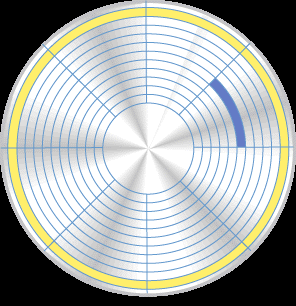
A typical track is shown in yellow; a typical sector is shown in blue. A sector contains a fixed number of bytes -- for example, 256 or 512. Either at the drive or the operating system level, sectors are often grouped together into clusters.
The process of low-level formatting a drive establishes the tracks and sectors on the platter. The starting and ending points of each sector are written onto the platter. This process prepares the drive to hold blocks of bytes. High-level formatting then writes the file-storage structures, like the file-allocation table, into the sectors. This process prepares the drive to hold files.