






Assignment: (Understand only)
-
Understand the basic form and functioning of a CD/DVD Drive
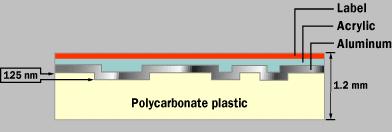
A CD has a single spiral track of data, circling from the inside of the disc to the outside. The fact that the spiral track starts at the center means that the CD can be smaller than 4.8 inches (12 cm) if desired, and in fact there are now plastic baseball cards and business cards that you can put in a CD player. CD business cards hold about 2 MB of data before the size and shape of the card cuts off the spiral.
What the picture on the right does not even begin to impress upon you is how incredibly small the data track is -- it is approximately 0.5 microns wide, with 1.6 microns separating one track from the next. (A micron is a millionth of a meter.) And the elongated bumps that make up the track are each 0.5 microns wide, a minimum of 0.83 microns long and 125 nanometers high. (A nanometer is a billionth of a meter.) Looking through the polycarbonate layer at the bumps, they look something like this:
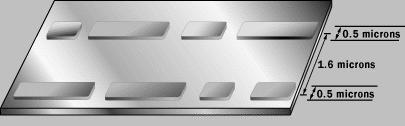
You will often read about "pits" on a CD instead of bumps. They appear as pits on the aluminum side, but on the side the laser reads from, they are bumps.
The incredibly small dimensions of the bumps make the spiral track on a CD extremely long. If you could lift the data track off a CD and stretch it out into a straight line, it would be 0.5 microns wide and almost 3.5 miles (5 km) long!
To read something this small you need an incredibly precise disc-reading mechanism.
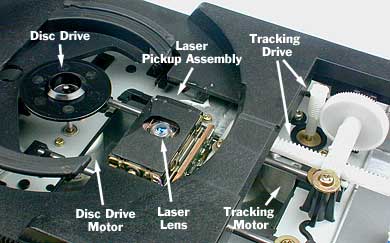
The CD player has the job of finding and reading the data stored as bumps on the CD. Considering how small the bumps are, the CD player is an exceptionally precise piece of equipment. The drive consists of three fundamental components:
- A drive motor spins the disc. This drive motor is precisely controlled to rotate between 200 and 500 rpm depending on which track is being read.
- A laser and a lens system focus in on and read the bumps.
- A tracking mechanism moves the laser assembly so that the laser's beam can follow the spiral track. The tracking system has to be able to move the laser at micron resolutions.
Inside the CD player, there is a good bit of computer technology involved in forming the data into understandable data blocks and sending them either to the DAC (in the case of an audio CD) or to the computer (in the case of a CD-ROM drive).
The fundamental job of the CD player is to focus the laser on the track of bumps. The laser beam passes through the polycarbonate layer, reflects off the aluminum layer and hits an opto-electronic device that detects changes in light. The bumps reflect light differently than the "lands" (the rest of the aluminum layer), and the opto-electronic sensor detects that change in reflectivity. The electronics in the drive interpret the changes in reflectivity in order to read the bits that make up the bytes.
The hardest part is keeping the laser beam centered on the data track. This centering is the job of the tracking system. The tracking system, as it plays the CD, has to continually move the laser outward. As the laser moves outward from the center of the disc, the bumps move past the laser faster -- this happens because the linear, or tangential, speed of the bumps is equal to the radius times the speed at which the disc is revolving (rpm). Therefore, as the laser moves outward, the spindle motor must slow the speed of the CD. That way, the bumps travel past the laser at a constant speed, and the data comes off the disc at a constant rate.
If you have a CD-R drive, and want to produce your own audio CDs or CD-ROMs, one of the great things you've got going in your favor is the fact that software can handle all the details for you. You can say to your software, "Please store these songs on this CD," or "Please store these data files on this CD-ROM," and the software will do the rest. Because of this, you don't need to know anything about CD data formatting to create your own CDs. However, CD data formatting is complex and interesting, so let's go into it anyway.
To understand how data are stored on a CD, you need to understand all of the different conditions the designers of the data encoding methodology were trying to handle. Here is a fairly complete list:
- Because the laser is tracking the spiral of data using the bumps,
there cannot be extended gaps where there are no bumps in the data track.
To solve this problem, data is encoded using EFM (eight-fourteen
modulation). In EFM, 8-bit bytes are converted to 14 bits, and it is
guaranteed by EFM that some of those bits will be 1s.
- Because the laser wants to be able to move between songs, data needs
to be encoded into the music telling the drive "where it is" on the disc.
This problem is solved using what is known as subcode data. Subcode
data can encode the absolute and relative position of the laser in the
track, and can also encode such things as song titles.
- Because the laser may misread a bump, there need to be
error-correcting codes to handle single-bit errors. To solve this
problem, extra data bits are added that allow the drive to detect
single-bit errors and correct them.
- Because a scratch or a speck on the CD might cause a whole packet of
bytes to be misread (known as a burst error), the drive needs to be able
to recover from such an event. This problem is solved by actually
interleaving the data on the disc, so that it is stored
non-sequentially around one of the disc's circuits. The drive actually
reads data one revolution at a time, and un-interleaves the data in order
to play it.
- If a few bytes are misread in music, the worst thing that can happen is a little fuzz during playback. When data is stored on a CD, however, any data error is catastrophic. Therefore, additional error correction codes are used when storing data on a CD-ROM.
There are several different formats used to store data on a CD, some widely used and some long-forgotten. The two most common are CD-DA (audio) and CD-ROM (computer data).